For QuickBooks® Enterprise Manufacturers who build with Sub-Assemblies.
QuickBooks Can’t Tell You What Parts Your Open Orders Need.
So You Do It by Hand.
If your finished goods include sub-assemblies, you already know the drill: export, paste, VLOOKUP, then work out every single line. In stock? Already on order? Used somewhere else? One assembly at a time. We built the report QuickBooks Enterprise left out.
Tell us how you build it. We’ll tell you straight.


The Order’s In. Now Comes the Hard Part.
Sound familiar?
One assembly at a time.
A new order lands. You set up the Assembly, open each sub-assembly’s BOM, export, paste, VLOOKUP. Then, for every single part, you stop and think. In stock? On order? Used elsewhere? By the time you finish, something has changed.
It’s all on you.
You’re the one who knows how it’s done. Miss one sub-assembly and a build stalls on a part nobody saw coming. Everyone looks at you.
Short or long. Both cost you.
Short on parts, and orders ship late or get cancelled. Long on parts, and cash sits on the shelf as inventory you didn’t need to buy. Neither shows up until it’s too late.
QuickBooks® has no report that shows every component your open sales orders need, all the way down through four sub-assemblies, more if needed. We built it.
One View. Every Open Order. Every Part.
- See every part your open orders need, through every sub-assembly
- Know what to order, and when, before production stops
- See which orders you can build and ship today
- Skip the export, paste, VLOOKUP routine
- Reports anyone can read, not just you
All with the QuickBooks you already run. No syncing. No new ERP. No migration.
Instead of discovering missing components mid-production, we know exactly what we need before we start.
See the Reports in Action
Five reports. Each one removes a spreadsheet from your week.
DatiReady · Production Planning
Stop exporting and figuring out BOMs by hand. See every component every open sales order needs, and where production will break.
DatiSight · Stock Planning
Know what to order and when, before a part nobody saw coming stalls the line and a customer starts complaining.
DatiTrend · Inventory Strategy
See where cash is tied up as excess inventory, and where you’re exposed to running short — before it shows up on the P&L.
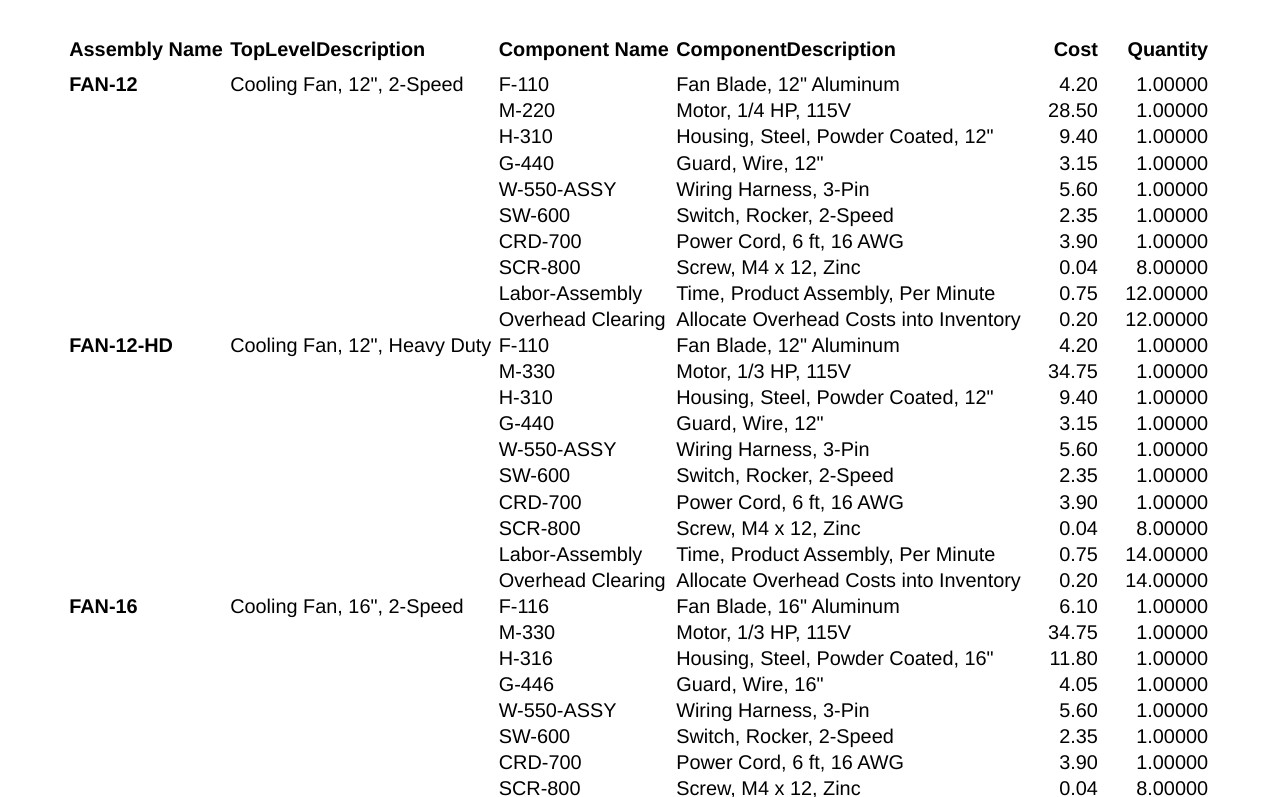
Parts by Assembly
Every part behind every BOM, without opening them one at a time.
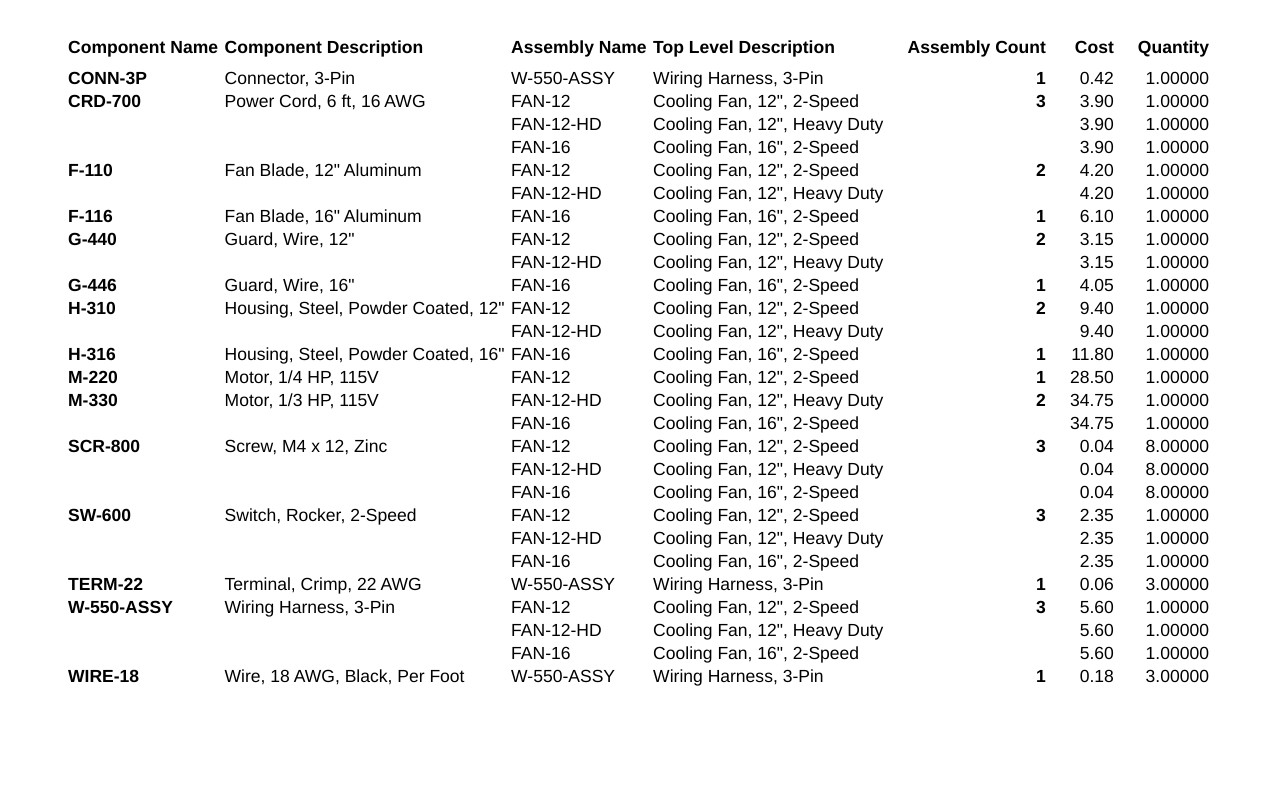
Assemblies with Parts
A part gets recalled or substituted. See every assembly it touches in seconds.
What to Expect
Tell us how you do it today
Name, email, and a line about your current process.
We reply within a day
Usually with a question or two about how you build.
Set up together, then test on your data
On a short Zoom, we get you running (15–30 minutes). Then test drive all five reports free for three weeks.
Choose Your Package
Every plan includes unlimited technical support and expert QuickBooks® advice. Not sure which fits? Ask first. When you’re ready, a free three-week trial includes all five reports — no obligation.
- Choose one: DatiReady, DatiSight, or DatiTrend
- Unlimited technical support
- Expert-level QuickBooks technical advice
Tell us what you’re trying to see. We’ll reply within a day.
Add one Assembly companion report anytime for $595/year
- Choose two: DatiReady, DatiSight, or DatiTrend
- Unlimited technical support
- Expert-level QuickBooks technical advice
- Report edits to add custom fields
Tell us what you’re trying to see. We’ll reply within a day.
Add an Assembly companion report for $595/year each — or get all five by moving up to Complete for just $720 more
- ✓ DatiReady
- ✓ DatiSight
- ✓ DatiTrend
- ✓ Parts by Assembly — instantly see every part behind any Bill of Materials
- ✓ Assemblies with Parts — trace every assembly a part is used in, in seconds — critical when a part gets recalled, substituted, or runs short
- Unlimited technical support
- Expert-level QuickBooks technical advice
- Report edits to add custom fields
Tell us what you’re trying to see. We’ll reply within a day.
Full Planning, Production & Purchasing Visibility
QuickBooks is a registered trademark of Intuit Inc.
We’ve Been in the Trenches With QuickBooks Manufacturers
We’ve lived the same QuickBooks headaches you have.
No ERP required. Avoid massive headaches and costs by enhancing QuickBooks instead of replacing it.
Proof is in the Reviews
Erik SebbyOperations Manager
Aldon Company Inc.
Pulling usable reporting data out of QuickBooks without juggling multiple spreadsheets has been a struggle at two companies I’ve worked for. We purchased a Datisfy reporting package that enables us to pull up real-time inventory data and make decisions much more quickly. Multiple departments within our company have benefitted from the reporting package. Our Production, Sales/Customer Service, Purchasing, and Accounting Teams regularly use the Datisfy reports. Angela and her Team have provided us with customized reporting solutions and support whenever we have needed assistance.

Mike MyherDirector of Admin
DisplayMax
Before finding Datisfy’ s inventory reports, I spent hours every week cobbling together spreadsheets just to figure out what components we needed to order. Now I can see at a glance not only what we need, but when we’ll need it – which has transformed our cash flow management. Instead of discovering missing components mid-production, we know exactly what we need before we start. We’ve also improved our on-time delivery. After just two months of using these reports, I can’t imagine running a manufacturing business without them. It’s like having the power of an ERP system while staying in QuickBooks. All of the information that I’m looking for at the touch of a button!

Questions Manufacturers Ask
Does QuickBooks Enterprise have a multi-level BOM report?
No. QuickBooks Desktop Enterprise has no built-in report that rolls an open sales order down through every sub-assembly to the parts you need to buy. You open each assembly’s BOM one at a time. Datisfy’s reports show every part for every open order in one view.
Which versions of QuickBooks does this work with?
QuickBooks Desktop Enterprise Manufacturing & Wholesale edition. It doesn’t work with Pro or Premier, because the connection tool our reports rely on is built into Enterprise only.
Does it change anything in my QuickBooks data?
No. Nothing writes back to your QuickBooks file. The reports only read your data, so it is never altered in any way, and the numbers come straight from QuickBooks.
How do I get started, and how long does it take?
About 15 to 30 minutes, together on a short call. We need the full path to your QuickBooks company file. We add one Custom Reporting user inside QuickBooks (not a regular user) and install the Datisfy Report Viewer on your PC or your Remote Desktop Server, wherever makes sense. You’ll need permission to install software there; if your IT team handles that, we’ll tell them exactly what’s needed.
How many levels of sub-assemblies do the reports handle?
Up to four levels of sub-assemblies under any assembly. If your products go deeper, we can extend it on request.
What does it cost, and can I start small?
It’s a subscription, paid by credit card annually, every six months, or monthly, whichever suits you. Start with one package and upgrade later; we pro-rate the difference. Enhancements and support are included as your needs change, and we’ll answer your QuickBooks technical questions with a straight answer.